

The ChatGPT API provides powerful AI capabilities that can enhance Odoo’s functionality, enabling intelligent automation, content generation, and data analysis. By integrating ChatGPT with Odoo, you can summarize invoices, generate product descriptions, analyze trends in employees’ attendance, and more. Odoo is an open-source, all-in-one business management software suite that integrates applications for ERP, CRM, accounting, sales, inventory, HR, e-commerce, and more into a single modular platform.
This guide shows you how to connect Odoo to the ChatGPT API to leverage AI features within your business applications.
Note: This guide requires server access to run Python scripts and custom integrations. If you need Odoo hosting with full SSH access, API support, and automated backups, Cloudpepper provides managed infrastructure that supports advanced customizations like ChatGPT integrations while handling all server maintenance.
Prerequisites
Before you begin:
- Deploy an Ubuntu 24.04 server.
- Install an Odoo instance via Docker. When you set up a new Odoo database, click the checkbox to Load demo data. Then, activate the following Apps when Odoo deploys:
- Invoicing
- Sales
- Attendances
- Sign up at OpenAI Platform and generate an OpenAI API key.
Create a Python Virtual Environment
A virtual environment keeps your Python packages separate from the system, making it easier to manage dependencies. The environment also makes it easier to manage dependencies, avoids version conflicts, and ensures that your code runs consistently across different machines. Follow the steps below to create the virtual environment.
- SSH to your server and update the package information index.
$ sudo apt update - Install Python virtual environment tools.
$ sudo apt install -y python3-venv python3-pip - Create a new
odoo-openai-integrationdirectory for your ChatGPT integration.$ mkdir ~/odoo-openai-integration - Switch to the new directory.
$ cd ~/odoo-openai-integration - Create a Python virtual environment:
$ python3 -m venv venv - Activate the virtual environment:
$ source venv/bin/activate(venv)should now appear at the beginning of your terminal prompt, indicating the virtual environment is active. - Upgrade
pip, the official package installer for Python and install basic dependencies.$ pip install --upgrade pip $ pip install wheel setuptools - Install the
openaiPython package usingpip.$ pip install openai
Connect Odoo to ChatGPT API with XML-RPC
In Python, the XML-RPC library lets your Python code communicate with remote servers using the XML-RPC protocol. Odoo exposes its API over XML-RPC, so by using xmlrpc.client, you can log in, query models, and perform actions (For instance, create, read, update, delete records) on an Odoo database remotely. To better understand how this Odoo ChatGPT integration works, this guide takes you through three different real-life examples.
To test the samples, use the correct credentials for the ChatGPT API and Odoo.
url = "YOUR_ODOO_INSTANCE_URL"db = "YOUR_ODOO_INSTANCE_DB_NAME"username = "YOUR_ODOO_INSTANCE_USERNAME"password = "YOUR_ODOO_INSTANCE_PASSWORD"open_ai_api_key = "YOUR_OPEN_AI_API_KEY"
Invoice Summary Generator
An Invoice Summary Generator automatically compiles key details from one or more Odoo invoices into a clear, concise report. Instead of manually reviewing each invoice line by line, the generator extracts and organizes the most important information so you can quickly understand totals, trends, and compliance.
- Create a new
invoice_summary_generator.pyfile.$ nano invoice_summary_generator.py - Enter the following information into the
invoice_summary_generator.pyfile.import xmlrpc.client from openai import OpenAI url = "YOUR_ODOO_INSTANCE_URL" db = "YOUR_ODOO_INSTANCE_DB_NAME" username = "YOUR_ODOO_INSTANCE_USERNAME" password = "YOUR_ODOO_INSTANCE_PASSWORD" open_ai_api_key = "YOUR_OPEN_AI_API_KEY" common = xmlrpc.client.ServerProxy(f"{url}/xmlrpc/2/common") uid = common.authenticate(db, username, password, {}) models = xmlrpc.client.ServerProxy(f"{url}/xmlrpc/2/object") invoices = models.execute_kw( db, uid, password, 'account.move', 'search_read', [[['move_type', '=', 'out_invoice']]], {'fields': ['name', 'partner_id', 'amount_total'], 'limit': 3} ) client = OpenAI(api_key=open_ai_api_key) for inv in invoices: prompt = f"Summarize this invoice: {inv}" response = client.chat.completions.create( model="gpt-4.1-mini", messages=[{"role": "user", "content": prompt}] ) print(response.choices[0].message.content) - Save and close the file. This code connects to an Odoo database via XML-RPC, retrieves three invoices, sends the invoices to the ChatGPT API to generate text summaries, and prints those summaries.
- Run the
invoice_summary_generator.pyfile. The'limit': 3clause tells your script to only summarize three records but you may adjust this value as needed.$ python invoice_summary_generator.pyOutput:
Invoice INV/2025/00008 is issued to LightsUp (partner ID 13) with a total amount of 750.0.
The invoice INV/2025/00008 is for the customer LightsUp (ID: 13) with a total amount of $750.00.
The invoice INV/2025/00002 is issued to Deco Addict (partner ID 9) with a total amount of 41,750.00.
Running ChatGPT Integrations in Production: Custom Python scripts require ongoing server management, security updates, and monitoring. Cloudpepper’s managed Odoo hosting provides full server access for custom integrations while automating backups, updates, and infrastructure maintenance. Try Cloudpepper free for 3 days with managed servers or 14 days with your own infrastructure.
Product Description Generator
A product description generator automatically creates clear, consistent descriptions for catalog items. Instead of writing details in your Odoo instance manually, the generator pulls key attributes like features and benefits into concise text, saving time and ensuring accuracy across listings.
- Create a new
product_description_generator.pyfile.$ nano product_description_generator.py - Enter the following information into the
product_description_generator.pyfile.import xmlrpc.client from openai import OpenAI url = "YOUR_ODOO_INSTANCE_URL" db = "YOUR_ODOO_INSTANCE_DB_NAME" username = "YOUR_ODOO_INSTANCE_USERNAME" password = "YOUR_ODOO_INSTANCE_PASSWORD" open_ai_api_key = "YOUR_OPEN_AI_API_KEY" common = xmlrpc.client.ServerProxy(f"{url}/xmlrpc/2/common") uid = common.authenticate(db, username, password, {}) models = xmlrpc.client.ServerProxy(f"{url}/xmlrpc/2/object") products = models.execute_kw( db, uid, password, 'product.product', 'search_read', [[]], {'fields': ['id', 'name', 'default_code', 'list_price'], 'limit': 3} ) client = OpenAI(api_key=open_ai_api_key) for prod in products: prompt = ( f"Generate a compelling product description for this item:n" f"Name: {prod['name']}n" f"Code: {prod['default_code']}n" f"Price: {prod['list_price']}" ) response = client.chat.completions.create( model="gpt-4.1-mini", messages=[{"role": "user", "content": prompt}] ) description = response.choices[0].message.content.strip() models.execute_kw( db, uid, password, 'product.product', 'write', [[prod['id']], {'description_sale': description}] ) print(f"Updated Product: {prod['name']}") print("New Description:", description) print("------") - Save and close the file. This code connects to an Odoo database via XML-RPC, retrieves three product records, uses the ChatGPT API to generate compelling descriptions for each, updates those descriptions back into Odoo, and prints the results.
- Run the
product_description_generator.pyfile.$ python product_description_generator.pyOutput:
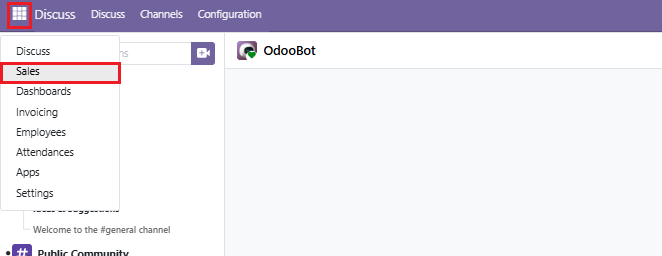
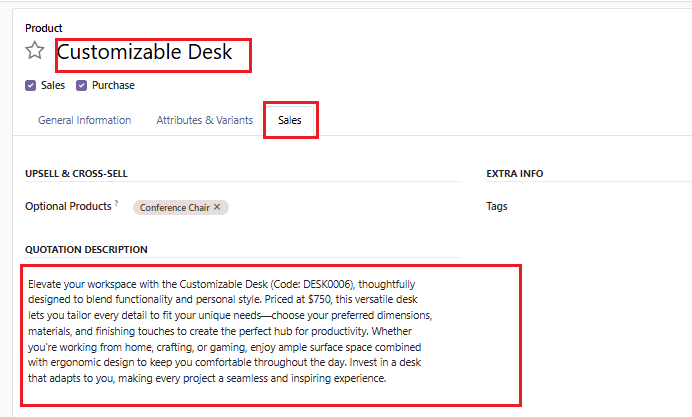
Updated Product: Customizable Desk New Description: Elevate your workspace with the Customizable Desk (Code: DESK0005) — where functionality meets personal style. Priced at $750.00, this versatile desk is designed to adapt to your unique needs, whether you're working, studying, or creating. Featuring adjustable components, premium materials, and a sleek, modern design, it offers the perfect blend of comfort and efficiency. Customize your setup with height options, modular storage, and a range of finishes to create a workspace that's truly your own. Invest in a desk that grows with you and inspires productivity every day. ------ Updated Product: Customizable Desk New Description: Elevate your workspace with the Customizable Desk (Code: DESK0006), thoughtfully designed to blend functionality and personal style. Priced at $750, this versatile desk lets you tailor every detail to fit your unique needs—choose your preferred dimensions, materials, and finishing touches to create the perfect hub for productivity. Whether you're working from home, crafting, or gaming, enjoy ample surface space combined with ergonomic design to keep you comfortable throughout the day. Invest in a desk that adapts to you, making every project a seamless and inspiring experience. ------ Updated Product: Local Delivery New Description: Ensure your customers receive their orders quickly and reliably with our Local Delivery service. Priced at just $10.00, Delivery_010 offers fast, convenient, and secure delivery directly to your doorstep. Perfect for businesses and individuals who value prompt service and seamless order fulfillment within their local area. Make every purchase hassle-free by choosing Local Delivery today! ------ - Log in to the Odoo dashboard. Then navigate to the Sales APP.
- Navigate to Products and select Products.

- Select any product that you updated using the Python script. Then, click the Sales tab to view the updated description.
Employees Attendance Summary Generator
An employee attendance summary generator takes raw check-in and check-out records from Odoo and automatically produces human-readable summaries of each employee’s work session. The generator transforms raw attendance logs into concise summaries that highlight when employees worked and for how long, making attendance tracking easier to understand and report.
- Create a new
employee_attendance_summary_generator.pyfile.$ nano employee_attendance_summary_generator.py - Enter the following information into the
employee_attendance_summary_generator.py.import xmlrpc.client from openai import OpenAI url = "YOUR_ODOO_INSTANCE_URL" db = "YOUR_ODOO_INSTANCE_DB_NAME" username = "YOUR_ODOO_INSTANCE_USERNAME" password = "YOUR_ODOO_INSTANCE_PASSWORD" open_ai_api_key = "YOUR_OPEN_AI_API_KEY" common = xmlrpc.client.ServerProxy(f"{url}/xmlrpc/2/common") uid = common.authenticate(db, username, password, {}) models = xmlrpc.client.ServerProxy(f"{url}/xmlrpc/2/object") attendances = models.execute_kw( db, uid, password, 'hr.attendance', 'search_read', [[]], {'fields': ['employee_id', 'check_in', 'check_out'], 'limit': 5} ) client = OpenAI(api_key=open_ai_api_key) for att in attendances: employee = att['employee_id'][1] if att['employee_id'] else "Unknown" prompt = ( f"Summarize this attendance record:n" f"Employee: {employee}n" f"Check-in: {att['check_in']}n" f"Check-out: {att['check_out']}" ) response = client.chat.completions.create( model="gpt-4.1-mini", messages=[{"role": "user", "content": prompt}] ) print(f"Employee: {employee}") print("Summary:", response.choices[0].message.content) print("------") - Save and close the file. This code connects to an Odoo database via XML-RPC, retrieves a few employee attendance records, sends each record to the ChatGPT API to generate a text summary, and then prints the employee name along with the AI-generated summary.
- Run the
employee_attendance_summary_generator.pyfile.$ python employee_attendance_summary_generator.pyOutput:
Employee: Abigail Peterson
Summary: Employee Abigail Peterson checked in on December 29, 2025, at 03:41 AM and checked out the same day at 07:11 AM, working a total of 3 hours and 30 minutes.
------
Employee: Anita Oliver
Summary: Anita Oliver checked in on December 29, 2025, at 12:41 AM and checked out on the same day at 5:41 AM.
------
Employee: Jennie Fletcher
Summary: Jennie Fletcher checked in on December 28, 2025, at 4:41 PM and checked out on December 29, 2025, at 4:41 AM, indicating a 12-hour work period overnight.
------
Employee: Anita Oliver
Summary: Anita Oliver checked in on December 28, 2025, at 12:41 AM and checked out on December 29, 2025, at 12:41 AM, indicating a 24-hour attendance period.
------
Employee: Mitchell Admin
Summary: Employee Mitchell Admin checked in at 13:02:58 and checked out at 18:09:22 on November 28, 2025.
------
Conclusion
You have successfully integrated the ChatGPT API with Odoo, unlocking powerful opportunities for AI-driven automation across your business processes. This Odoo ChatGPT integration enables you to create intelligent CRM automation, build AI-powered chatbots, generate automated insights, implement smart inventory predictions, and craft personalized marketing content.
Always ensure that AI-generated outputs are tested for accuracy and appropriateness before deploying them in production, particularly for customer-facing applications.
Ready to deploy your ChatGPT-powered Odoo in production? Running custom integrations requires reliable hosting with full server access, automated backups, and proper monitoring. Cloudpepper provides managed Odoo hosting with SSH access, API support, and zero vendor lock-in. Start your free trial today—3 days with included servers or 14 days when connecting your own infrastructure.
