Odoo vs. Microsoft Dynamics 365: Complete 2026 Comparison
Odoo vs. Microsoft Dynamics 365 compared across pricing, features, hosting, and ease of use. Find out which ERP or CRM fits your business in 2026.
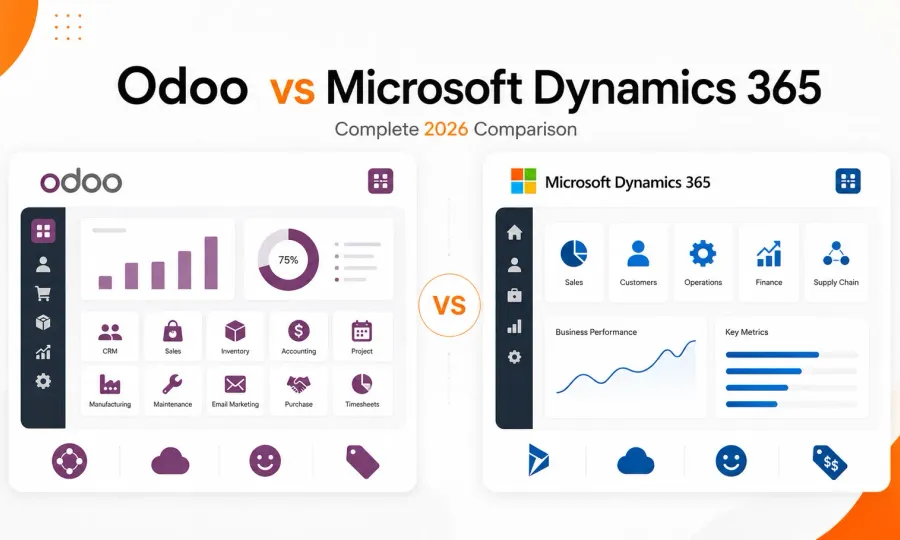
If you’ve been looking for the best CRM or ERP for your business, chances are you’ve already come across two big names: Odoo and Microsoft Dynamics. At first, they might seem like they belong in the same category, but the more you look into them, the more complicated the decision gets.
Choosing the right CRM or ERP tool is a big decision for any business owner or decision-maker. The right platform helps you connect your sales pipeline, finances, inventory, and team into a single, coherent system. The wrong one, however, creates inefficiencies that’ll quietly cost you time and money every day.
That said, choosing between Odoo vs Microsoft Dynamics only feels difficult because you don’t yet have the full picture. In this guide, we’ll compare Odoo vs. Microsoft Dynamics in detail, breaking down everything you need to know, from core features to deployment options. By the end, you’ll have a clear framework to make the right call for your business. If you’re also trying to weigh Odoo against Salesforce, check out this Odoo vs. Salesforce comparison, or see how pricing stacks up in the Odoo vs. QuickBooks guide.
Quick Snapshot: Odoo vs Microsoft Dynamics at a Glance
When comparing Odoo vs. Microsoft Dynamics, there’s one crucial question you’ll need to answer: do you need a single, unified system to run your entire business, or a powerful, modular suite of integrated business applications that you can deploy as needed? For verified adoption and pricing data, see our Odoo Statistics 2026 roundup.
Here’s a brief explainer of each tool:
-
Odoo is a comprehensive, open-source, modular ERP platform with a suite of integrated business applications for managing operations, including accounting, CRM, inventory, e-commerce, and HR.
-
Microsoft Dynamics is an AI-powered suite of cloud-based business applications spanning CRM and ERP functions, primarily designed for scalability, deep integration with the Microsoft ecosystem, and the complex operational needs of mid-sized to large enterprises.
The table below provides a quick, visual recommendation guide:
| Scenario | Best Choice | Reason |
|---|---|---|
| All-in-one system to manage every department | Odoo | Fully integrated suite of ERP and CRM tools in one place |
| Businesses with a lean budget | Odoo | Flat-fee pricing gives access to all tools without paying for each one separately |
| Large businesses (500+ employees) | Microsoft Dynamics | Gives you access to purpose-built enterprise-grade CRM and ERP tools |
| Already deep in the Microsoft ecosystem | Microsoft Dynamics | Syncs natively with existing Microsoft tools like Office 365, Teams, and Azure |
| Full control over software and data | Odoo | Open-source design lets you self-host, modify code, and build or install custom modules |
| CRM-focused teams only | Either | Choose Dynamics for advanced CRM capabilities; choose Odoo for lower cost |
| eCommerce Startup | Odoo | Gives you access to powerful inventory, accounting, and CRM tools at a minimal flat-fee cost |
Odoo vs. Microsoft Dynamics: Feature Comparison a Glance
Odoo and Microsoft Dynamics are both top-of-the-line CRM and ERP software. Each has its differences that contribute to a unique user experience. Here’s a tabular comparison of Odoo vs. Microsoft Dynamics:
| Feature | Odoo | Microsoft Dynamics |
|---|---|---|
| Hosting | Cloud Odoo hosting and on-premise | Primarily on cloud (Microsoft Azure) |
| Quality Control | Built-in QMS; pass/fail checks, quality alerts, corrective actions | Automated quality orders, non-conformance management, CAPA workflows |
| Reporting & Analytics | Dynamic pivot tables, dashboards | Strong, AI-assisted |
| Inventory Management | Full module, multi-warehouse, AI-powered granular inventory management | Multi-location tracking, AI-powered demand forecasting with real-time stock visibility |
| Sales Management | Yes (simpler interface) | Yes (more complex) |
| CRM Fundamentals | Yes, integrated | Yes (can be difficult to configure) |
| Accounting | Yes, integrated module | Yes (primarily via Business Central) |
| Implementation Time | 1–24 months | 3–24 months |
| Integrated apps | 44,000+ community apps (80+ main apps) | 11 core specialized apps |
| Customization | Highly flexible (due to open source design) | Less flexible (but customizable via API) |
| Core architecture | Unified | Suite-based |
| Ease of Use | Simple, intuitive UI | More complex enterprise UI |
| AI | Dedicated AI app featuring customizable AI agents | Comprehensive AI built into ERP and CRM experiences |
| Pricing | From $0 | From $65/month (Dynamics 365 sales) |
| Free trial | Yes (15-day) | Yes (30-day) |
| Best for | Small, growing SMEs and businesses | Mid-size to large enterprise businesses |
The table above makes it clear that the major difference when comparing Odoo vs. Microsoft Dynamics lies in their architectural philosophies. Odoo is built as a fully integrated, unified system where core functions like accounting, inventory, HR, and CRM function as native modules within a single environment. This, in turn, means that you’ll get a stable experience and minimize reliance on external integrations.
In contrast, Microsoft Dynamics operates as a suite of specialized applications (e.g., Sales, Finance, and CRM). Each of these applications is optimized for depth, but full deployment requires additional configuration, add-ons, or inter-product integration.
Odoo vs. Microsoft Dynamics: Detailed Feature Comparison
Now that you have a brief overview of how Odoo and Microsoft Dynamics stack up against each other, here’s a more detailed core feature comparison.
Hosting
Hosting simply refers to where your CRM or ERP software “lives.” This ultimately determines how much control you’ll have over the software, how much you spend on infrastructure, and how quickly you can scale. The most popular hosting options are Cloud-based and On-premise, both of which Odoo and Microsoft Dynamics offer. Here’s a breakdown of how both stack up in terms of hosting options.
Microsoft Dynamics Hosting
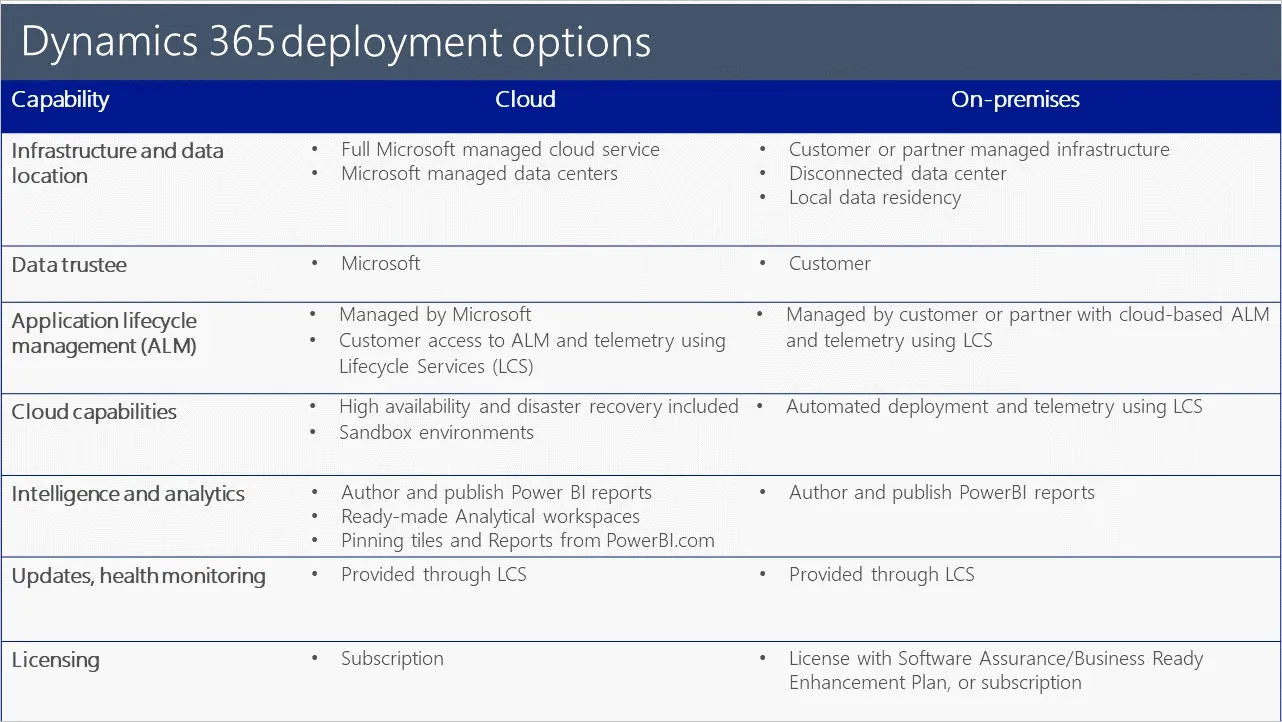
Microsoft Dynamics offers both cloud-based and on-premise hosting, but its primary focus is on cloud-based hosting. In fact, access to advanced AI and Copilot features like generative help and guidance is actually exclusive to its cloud version. Microsoft Dynamics also restricts access to its AI integration with Power BI to the cloud version. This means if you opt for on-premise hosting, you won’t have full access to every feature you might need.
That said, opting for on-premises hosting could lead to higher deployment costs, increasing your total cost of ownership (TCO). This is because you will have to set up your own infrastructure and sandbox environments, and configure your own disaster recovery solutions rather than relying on Microsoft’s.
Odoo Hosting
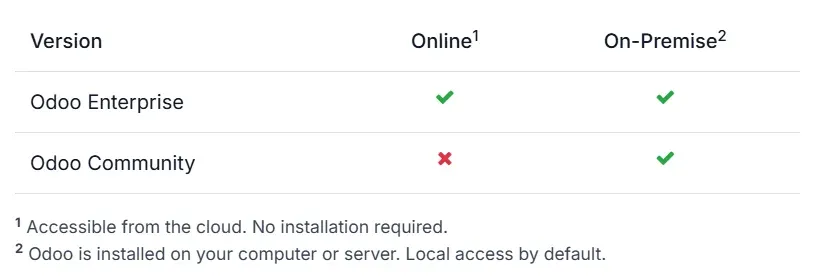
Like Dynamics, Odoo offers both on-premise and cloud-based hosting. However, that’s where the similarities end. Unlike Dynamics, which tries to force you to use cloud hosting, Odoo gives you complete freedom to choose the hosting type you want. There are four distinct options:
-
Odoo Community: supports only self-hosted (on-premise) deployment, which you can run in-house or hand to a managed Odoo Community host
-
Odoo Enterprise: supports both online and on-premises hosting (ideal if you want the option of being able to switch between on-premises and cloud hosting as needed).
-
Odoo.sh: Odoo’s official Platform as a Service (PaaS) option that lets you easily mix both types of hosting options.
-
Cloudpepper: a managed Odoo hosting alternative to Odoo.sh that combines the convenience of a fully managed platform with dedicated server resources and flat-rate pricing. Unlike Odoo.sh’s per-worker pricing model, Cloudpepper gives you predictable monthly costs, dedicated infrastructure (not shared), and the freedom to host on your own cloud provider if you prefer.
With Odoo, you will have access to all platform features, whether you choose online (cloud) or on-premises hosting. Your choice ultimately depends on what you want. For example, if you only want access to Odoo’s app suite and you’re not interested in any third-party or custom options, Odoo Online is the fit for you. However, if you’re particular about flexibility, then Odoo’s on-premise hosting option is even more preferable.
This is because, with Odoo online, you can only install apps available on Odoo’s online platform (full access to Odoo’s entire app suite). However, with Odoo on-premises, you can install third-party applications or even customize your own.
Customer Relationship Management (CRM)
CRM is the feature responsible for how you attract, track, and retain customers. It includes several functionalities from contact management and lead tracking to pipeline visibility and sales activity.
In Microsoft Dynamics, CRM is more of a coordinated effort across different applications rather than just one. For example, for pipeline management and lead scoring, you’ll need Dynamics 365 Sales. If you need to know how to create a better buying experience for your customers and partners, you’ll need access to Dynamics 365 Commerce. Dynamics 365 Contact Center is the application you’ll need for managing feedback and customer engagement across digital and voice channels.
This multi-channel approach is good for getting deeper insights, but it comes with two serious trade-offs. Firstly, because each feature is a standalone application, you will need a subscription for each one before you can use it. Secondly, the process of integrating all these different apps into your existing workflow could be quite complex.
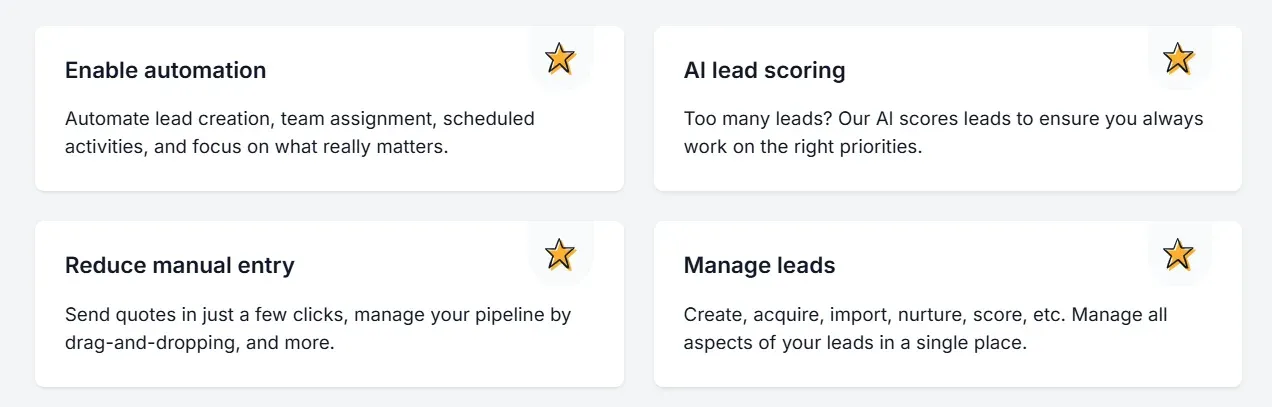
By comparison, Odoo’s CRM offers a comprehensive integration of all core CRM functionalities into a single interface, powered by AI. This unified build includes features such as automated lead creation and management, activity scheduling, pipeline tracking, and customer management. As a result, you will have access to a streamlined tool that lets your sales teams easily move from lead generation to invoicing without switching systems.
Also, since all the CRM features you need are already integrated, you won’t have to pay to access each one. In addition, you can seamlessly integrate Odoo with your email, live chat, SMS, and VoIP channels, further boosting flexibility at no additional cost. The interface is relatively simple, making adoption easier for smaller teams. If you’re evaluating Odoo CRM against a dedicated CRM tool, see Odoo vs. HubSpot.
Pricing
Pricing is also another major factor to consider when comparing Odoo vs. Microsoft Dynamics. Here’s a breakdown of the core differences between them.
Microsoft Dynamics Pricing
Microsoft Dynamics is part of the Microsoft suite of applications, making it a top industry choice. However, it is a suite-based ERP and CRM tool. This means that every tool in the CRM or ERP bundle is a standalone application you’ll have to pay for separately. For example, if you plan on getting the Microsoft Dynamics 365 Sales, here are the price points to consider:
-
Dynamics 365 Sales Professional: $65/month per user (includes core sales force automation, Microsoft 365 interoperation, reporting, and dashboards)
-
Dynamics 365 Sales Enterprise Edition: $105/month per user (includes everything in Sales Professional + Copilot in Dynamics 365 and access to agentic capabilities)
-
Dynamics 365 Sales Premium: $150/month per user (includes everything in Sales Enterprise + 1,000 Copilot credits, Sales insights, AI-powered recommendations, and data enrichment)
-
Microsoft Relationship Sales: Custom pricing (includes everything in Sales Enterprise + LinkedIn Sales Navigator)
If you want to add the Dynamics 365 Business Central to this, you will need to pay the following additional subscription fees based on which plan you choose:
-
Dynamics 365 Business Central Team Members: $8/month per user
-
Dynamics 365 Business Central Essentials: $80/month per user
-
Dynamics 365 Business Central Premium: $110/month per user
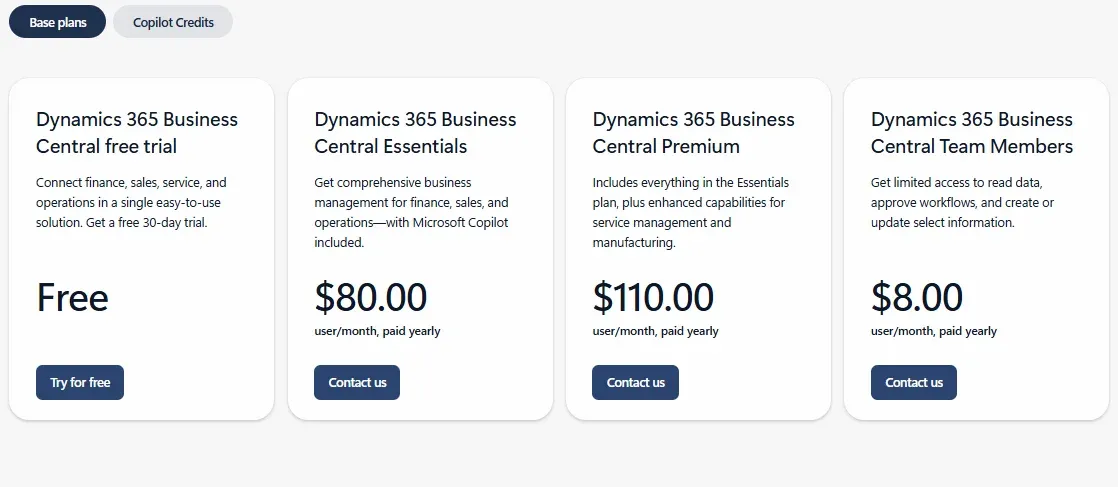
In other words, each additional application you intend to use, such as Customer Service or Supply Chain Management, comes with its own cost.
Odoo Pricing
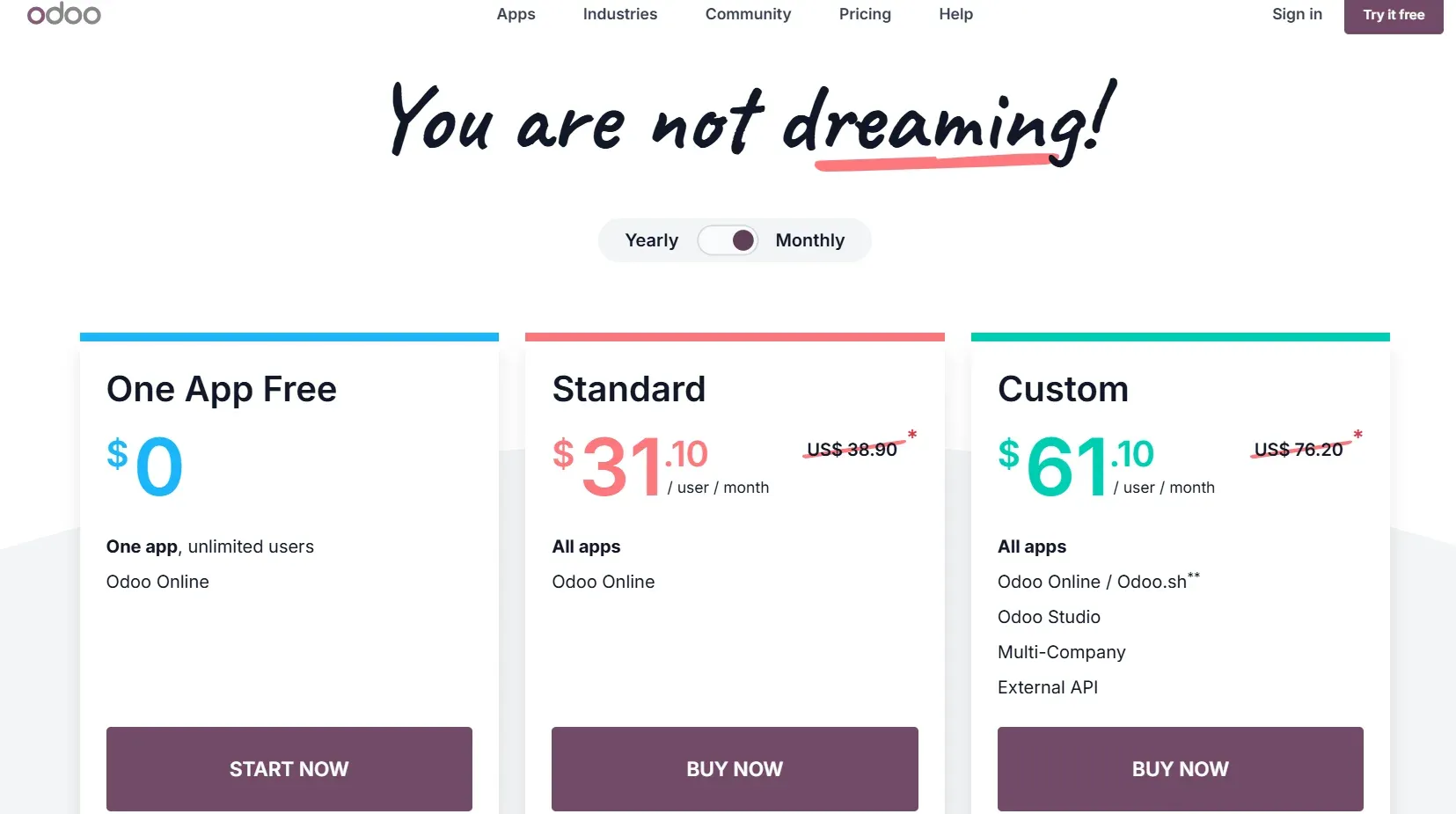
Conversely, Odoo is designed with affordability in mind to ensure it’s accessible to businesses of all sizes. A single flat-fee payment gives you access to Odoo’s entire suite of CRM and ERP features. For a full breakdown of what you’ll actually pay, see how much Odoo costs. As a result, you won’t have to worry about paying separate fees each time you want to access a new tool. This makes it the best option for small businesses and business owners looking to get the most value per dollar spent.
Here’s a breakdown of its pricing structure:
-
One App Free: $0 (one app, unlimited users)
-
Standard: 31.10/user/month (access to all apps, Odoo Online)
-
Custom: $61.10/user/month (access to all apps, Odoo Online, Odoo Studio, multi-company, and external API support)
Ease of Use
Microsoft Dynamics is a powerful CRM and ERP platform, but it is not a simple one to use. It has a dense and rigid interface, which you might find familiar to users with a Microsoft background. But if this is your first contact with a Microsoft product, your employees may find its steep learning curve challenging or even overwhelming. That said, it does remain an excellent option for large organizations with dedicated IT resources.
For smaller businesses, Odoo is a more ideal fit. This tool comes with a clean, intuitive interface that is highly consistent across modules. This makes it easier for teams to learn and adapt quickly, translating into faster onboarding and lower training costs.
Scalability
When it comes to scalability, the right pick between Microsoft Dynamics and Odoo depends mainly on the size of your business and your budget. If you’re a small startup or SME looking for a cost-effective path to scaling, then Odoo’s modular design makes it an ideal choice. This is because you will be able to start with only the apps your business requires today, then activate new ones as you grow, without needing to migrate to a new system or requiring major budget increases at every stage. Microsoft Dynamics, however, is more suited to scaling large, complex business operations.
Odoo vs. Microsoft Dynamics: Pros and Cons
Comparing Odoo vs. Microsoft Dynamics also means weighing different pros and cons, and for every advantage, there is usually a trade-off. Here’s what that looks like.
Odoo
| Pros | Cons |
|---|---|
| Broad Module Lineup: Combines multiple business functions (CRM, ERP, HR, accounting) in one system | Feature Depth: Some modules are less specialized or advanced than those offered by enterprise competitors. |
| Flexible Deployment: Supports cloud, on-premise, and hybrid (via Cloudpepper Odoo hosting). | Version Differences: Access to hosting features depends on the version of Odoo you have (community or enterprise). |
| Cost and implementation: Odoo is far cheaper and faster to implement than several other ERP or CRM options on the market. | Scalability Limits: Odoo is better suited for SMEs and smaller businesses. You may struggle with using it for highly complex enterprise-level operations |
| Open Source: Its open-source design allows deep customization and high flexibility | Technical Requirements: Customization often requires hiring developers or technical expertise. |
Microsoft Dynamics
| Pros | Cons |
|---|---|
| Advanced Feature Depth: Microsoft Dynamics’ suite-based design allows for apps with far deeper feature specializations than you’ll get with other competitors | Expensive: Each app you include in your workflow comes with additional subscription costs, making it a far more expensive option. |
| Scalability: Natively designed to handle large, complex scaling with relative ease and efficiency | Slow implementation: Deployment could take as long as 24 months, and be quite resource-intensive |
| Modular Specialization: Best-in-class tools for specific CRM and ERP functions like Sales, Finance, and Supply Chain. | Fragmentation Risk: You will need to purchase multiple subscriptions to achieve full ERP or CRM coverage |
| Strong Ecosystem Integration: Its seamless connectivity with other Microsoft tools will help you to enhance productivity and data flow significantly | Complexity: May be too complex for small or simple businesses |
Odoo vs Microsoft Dynamics Use Case Recommendations: Who Should Use What
Odoo and Microsoft Dynamics are both top-shelf ERP and CRM tools. As such, choosing the right one for your business is not necessarily a matter of quality as much as it is context. It all depends on which option fits your current business type and growth stage.
Here are some real-world categorizations to help you decide your ideal fit.
1. The Enterprise Giant
You fall into this category if you’re a large organization operating across multiple geographic locations with complex, deep workflow needs. Typically, you’ll want a CRM or ERP software that can easily handle serious operational tasks at scale without breaking down.
For this, Microsoft Dynamics is the most natural fit. This tool has a suite-based architecture that is purposefully designed to handle significant complexity at very high volumes. Dynamics also offers specialized apps for various CRM and ERP needs, like supply chain management, accounting, and sales. As such, you’ll be getting more advanced features.
Scaling a large, complex organization
2. The Budget-conscious Builder
This category includes startups and small businesses that need to move fast but cannot afford to burn cash on several software subscriptions. You fit in this category if you’re operating on a lean budget and your goal is to maximize the value of every dollar spent.
Here, Odoo is the clear winner. For starters, you get a free plan with decent feature access that you can use to get started. Meanwhile, paid plans start at just $31.10 per month, and they include access to all Odoo modules, meaning you won’t need to pay extra every time you want to use something else.
3. The Full-stack Controllers
This category is for businesses that prioritize complete (or near-complete) data ownership and control. You fit here if you run a business that requires unique operational designs, prefer to have full control over your ERP or CRM workflows, or often have to deal with sensitive data.
Odoo and Microsoft Dynamics both support on-premise hosting, which gives you some measure of control. However, the real defining attribute is Odoo’s open-source design, which gives you greater operational flexibility. Note, however, that you will need to have significant in-house technical expertise to get the most out of Odoo.
4. The Revenue Engine
This category includes businesses that run many high-volume pipelines. Typically, you’ll need a CRM or ERP tool that offers deeper forecasting, automation, actionable customer insights, and multi-channel engagement than standard options.
For this use case, Microsoft Dynamics is the perfect fit. This tool uses specialized sales software, Dynamics 365 Sales, that is purpose-built for high-performance sales optimization and management. It comes with features such as AI-powered lead scoring, deep pipeline analytics, and native LinkedIn Sales Navigator integration (requires a Microsoft Relationship subscription).
Odoo vs Microsoft Dynamics: Which ERP Should Your Business Actually Get?
Ultimately, if you have layered business processes that require specialized tools for each department and sufficient resources, Microsoft Dynamics is a stronger fit for you. It is built to handle serious enterprise-scale operations and scale with minimal challenges.
On the other hand, if you run a small business, work with a leaner budget, or have relatively simple workflow needs, Odoo is the right choice for you. It is faster to deploy, easier to use, and it keeps your entire tech stack streamlined into a singular app. You can even outsource your hosting to specialized providers like Cloudpepper, freeing you up to focus on other parts of your business.