Odoo vs. QuickBooks 2026: Which Is Right for Your Business?
Odoo vs. QuickBooks 2026 compared across features, pricing, TCO, and use cases. Discover whether your business needs accounting software or a full ERP.
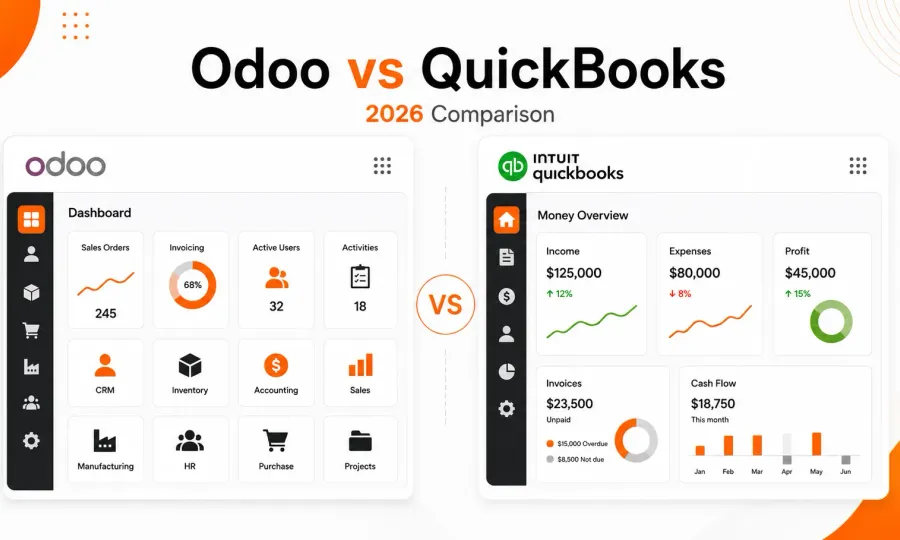
Choosing between Odoo vs. QuickBooks shapes how your entire business runs, not just how it keeps books. Beyond subscription costs, the wrong fit quietly bleeds you through redundant operations, slow workflows, and dirty data that lead to poor financial decisions.
However, choosing the right software for your business is easier if you understand your options and how they fit into your operations. To help you, this article provides a detailed comparison of Odoo and QuickBooks, highlighting the core functional differences, real-world pricing scenarios, and a decision framework to help you choose the right solution for your business. If you’re considering CRM or ERP for your business, our Odoo vs. Salesforce comparison provides useful insight. If you’re weighing Odoo against a full Microsoft ERP suite, see Odoo vs. Microsoft Dynamics 365.
Odoo vs. QuickBooks: A Quick Comparison
Image courtesy of Unsplash
The Odoo vs. QuickBooks comparison is not an apples-to-apples comparison. Here, we’re comparing specialized accounting software with an all-inclusive business management system.
Below are their indiviual position to give you a better perspective:
-
Odoo is an open-source ERP that focuses on affordability, flexibility, and integrated business management across all business departments.
-
QuickBooks is a comprehensive cloud-based accounting software designed to help small and medium businesses manage their bookkeeping and financial operations.
Below is a table that recommends the best use cases for each option:
| Scenario | Best Choice | Reason |
|---|---|---|
| Solopreneur or Micro-business | QuickBooks | Intuitive interface, rapid setup, and seamless tax compliance for small-scale operations. |
| Scaling SMB (10–250+ employees) | Odoo | Replaces “app spaghetti” by integrating accounting, CRM, HR, and inventory in one database. |
| Manufacturing & E-commerce | Odoo | Built-in MRP, PLM, and multi-warehouse tracking that QuickBooks cannot match without expensive add-ons. |
| Service Firms & Local Agencies | QuickBooks | Best-in-class automated bank feeds and a massive network of CPAs who already know the software. |
| Strict Data Sovereignty Needs | Odoo | While QuickBooks is cloud-only, Odoo offers on-premise or managed hosting for full data control. |
The core difference between Odoo and QuickBooks lies in focus and coverage. While QuickBooks is a specialized accounting software, Odoo is an integrated suite that combines accounting with other essential business modules for whole-organization operation.
Choose QuickBooks if your business only needs a financial ledger or a tool focused solely on finances. But if you want a comprehensive system that scales with your business on all fronts, from accounting to sales, inventory, and HR, choose Odoo.
If you choose Odoo, your hosting option lets you leverage the cost advantage most effectively. Cloudpepper, built specifically for Odoo deployments, offers managed hosting starting at only $29/month.
Accounting Software vs. ERP: What is the Difference?
To understand the difference between Odoo and QuickBooks, you must understand that they are built on different design philosophies.
Although they both have accounting and financial management capacities, they are not different brands of the same product. One is an accounting software, while the other is an ERP system. In this section, we’ll examine each tool individually to discern their difference and where they overlap.
What is QuickBooks? Exploring the Accounting Software
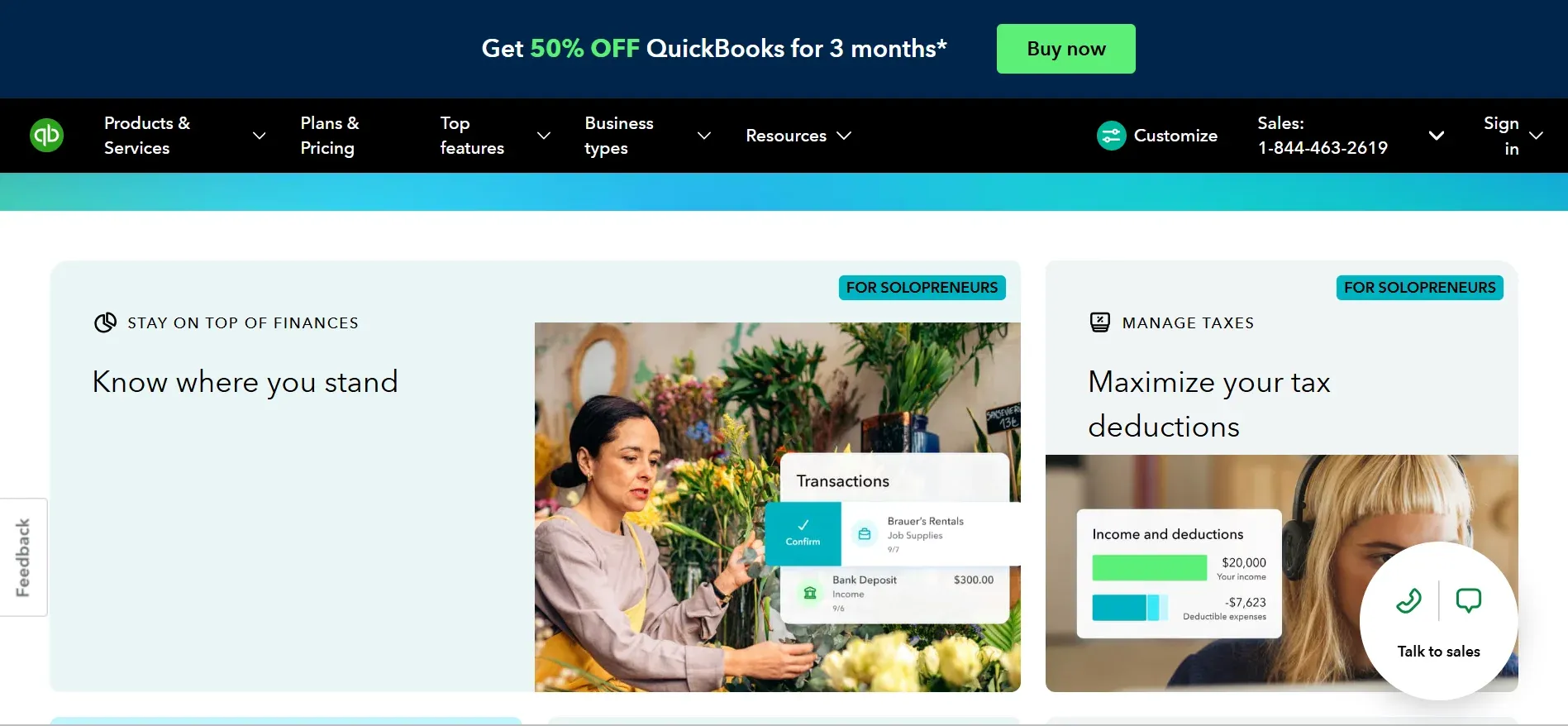
QuickBooks is a comprehensive cloud-based accounting software designed to help small and medium businesses manage their bookkeeping and financial operations.
Fundamentally, it is a Ledger-First system that manages customer interactions, financial transactions, and sales pipelines. QuickBooks helps handle all financial activities, from simple tracking of inflows and outflows to managing payroll, financial health, and tax compliance.
Using QuickBooks involves entering an invoice for a sale or syncing it from another app. After that, the system will creatively record the financial impact — the debit and credit.
While QuickBooks provides beautiful, accurate ledgers ready for seamless manipulation, it is limited in reach. It doesn’t capture real-time activities in the warehouse or manufacturing floor. You’ll need to get a separate app and synchronize them to surmount this limitation.
What is Odoo? Defining the ERP
Odoo is an open-source ERP that focuses on affordability, flexibility, and integrated business management across all business departments. It is a Process-First system.
Unlike QuickBooks, where accounting is the main event, in Odoo, accounting is only a consequence of your entire business operations. This ERP offers an integrated platform for managing every department, from Sales to Manufacturing, Inventory, Accounting, and HR — all leveraging the same database in real time.
In Odoo, when a sales rep enters an order, Inventory automatically updates the stock level, Warehouse receives a packing slip, and Accounting automatically generates the invoice. All these happen instantaneously without requiring manual data entry between departments.
Why the Comparison?
Although they’re different products, comparing Odoo and QuickBooks is reasonable because they both have top-tier accounting capabilities. While QuickBooks is a specialized accounting software, Odoo’s integrated suite also features an accounting module.
The true basis for this comparison is that, on one hand, Odoo’s accounting module is sophisticated enough to rival QuickBooks. On the other hand, you can extend QuickBooks to offer ERP features using multiple third-party add-ons.
For businesses, the choice implication is simple: If you only need to manage sales and finances, the specialized QuickBooks is best. But if you need a system to manage all business operations, Odoo is ideal.
Odoo vs. QuickBooks: Comparing Individual Features
While Odoo and QuickBooks can both manage your books and finances, they differ in how they handle specific business operations. Their depths in specific areas, such as automation and customization, also vary significantly. You must consider these differences to choose the best for your business.
The table below compares 11 features of both tools and their performance in real-world business applications:
| Feature | Odoo | QuickBooks | Notes |
|---|---|---|---|
| Software Category | Full open-source ERP | Specialized Accounting Software | Odoo is a suite; QuickBooks is a tool. |
| Core Accounting | Professional grade: AI-powered reconciliation | Best-in-class: industry standard for CPAs | QuickBooks is more intuitive; Odoo is more automated |
| Inventory Management | Advanced (Multi-warehouse, Batch/Serial tracking) | Basic (Inventory tracking in higher tiers only) | Odoo is built for physical goods companies |
| Sales & CRM | Fully integrated CRM and lead management | Basic customer tracking; | Odoo keeps sales and finance in one app |
| Invoicing & Payments | Native; quote-to-cash automation | Excellent: automated reminders and blank feeds | Both are very strong in this category |
| Manufacturing (MRP) | Dedicated module with PLM and Maintenance | Not included (requires third-party apps) | Odoo is the clear winner for manufacturers |
| Human Resources | Integrated Payroll, Leaves, and Recruitment | Payroll is available as a paid add-on | Odoo manages the entire employee lifecycle |
| Reporting & BI | Real-time dashboards across all modules | Strong financial reports; limited operational data | QuickBooks reports the ‘How Much,’ while Odoo also reports the ‘Why.’ |
| Customization | Highly flexible (Open-source access) | Limited to API and standard settings | Odoo adapts to you while you adapt to QuickBooks |
| Third-Party Apps | 40,000+ apps in the Odoo ecosystem | 750+ apps in the Intuit Marketplace | Odoo’s ecosystem is massive and modular |
| Deployment | Cloud, On-Premise, or Managed Hosting | Cloud only (Online) or local (Desktop) | Odoo offers more hosting sovereignty |
From the table above, the fundamental difference between Odoo and QuickBooks lies in the scope and coverage. While QuickBooks focuses on improving and perfecting the accounting workflow, Odoo covers the entire business lifecycle.
A good example is evident in the Inventory Management feature. While QuickBooks can tell you how many items you have left, Odoo can reveal their exact position across different warehouses, track their expiration dates, and even trigger a Request for Quotation to your supplier when the stock is low.
Therefore, if you’re a small business with simple financial management needs, QuickBooks’ polished interface will feel faster. But if your business has multiple departments and handles complex projects, Odoo offers an operational depth that QuickBooks cannot match without a fragile app stack.
Odoo vs. QuickBooks: True Price Comparison
Odoo and QuickBooks use different pricing models. While one uses the pay-as-you-grow model, the other offers an all-inclusive suite subscription.
Nevertheless, the price tags on each’s marketing page rarely capture the actually price you pay. To find the true cost of each option, we must calculate the Total Cost of Ownership (TCO) over a defined period. This usually captures hidden costs from third-party integrations, user scaling, and other factors.
To make an accurate price comparison, this section will first compare pricing per user for each system, then compare TCO over a three-year period.
QuickBooks Pricing
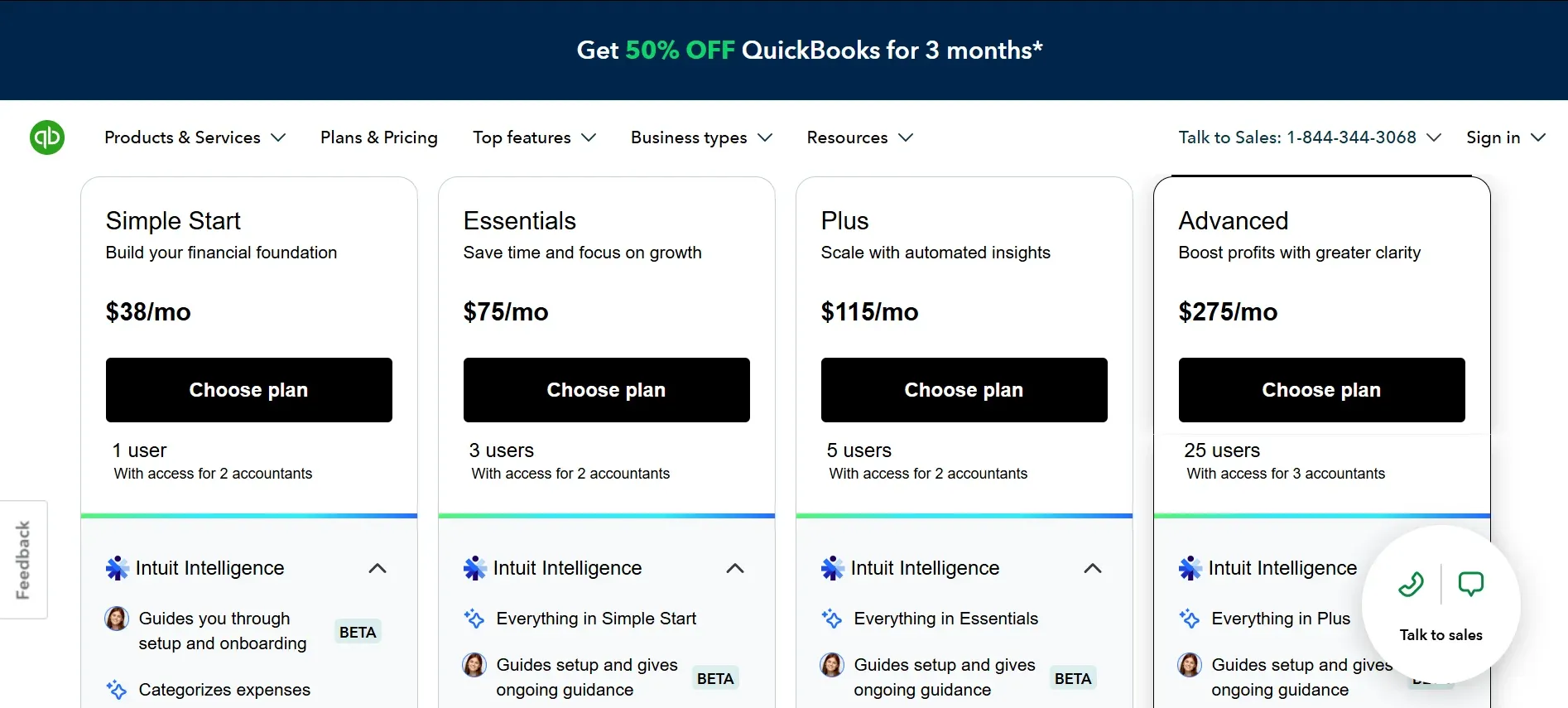
QuickBooks offers a tiered pricing model where you pay as you grow. Below are the pricing levels for QuickBooks and their current costs:
-
Simple Start: $38/month (Offers basic features for 1 user)
-
Essentials: $75/month (Up to 3 users; adds bill management)
-
Plus: $115/month (Up to 5 users; adds inventory and project tracking)
-
Advanced: $275/month (Up to 25 users: adds custom roles and batch invoicing)
It’s important to note that QuickBooks, payroll, advanced inventory, and deep CRM capabilities usually require monthly fees ranging from $50 to $500+.
Odoo Pricing
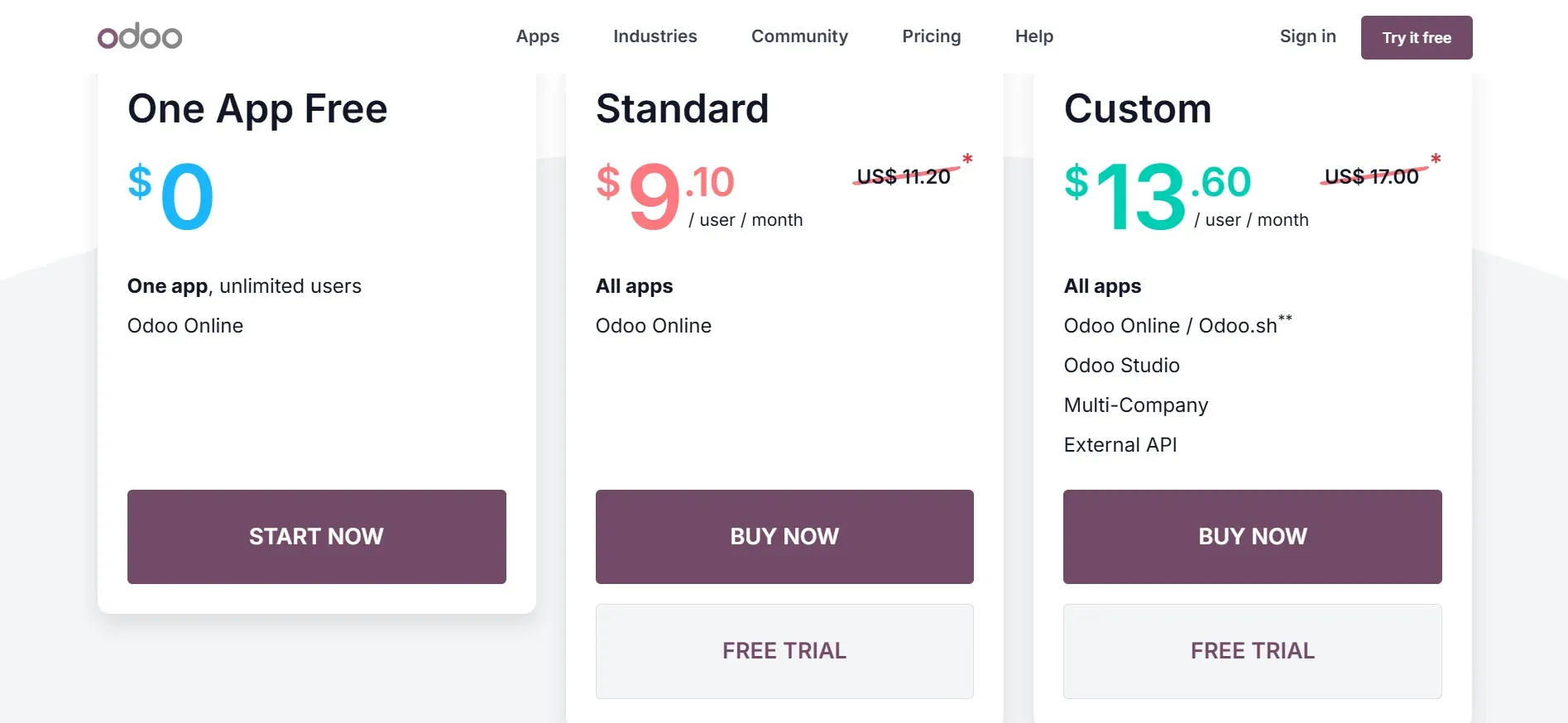
With Odoo, you enjoy more transparent pricing that provides access to all modules for a flat fee. Here are the pricing tiers for Odoo ERP:
-
Community Edition: $0 (unlimited users, self-hosted, open-source)
-
One App Free: $0 (one app, unlimited users, hosted by Odoo)
-
Standard: $31.10/user/month (all apps, hosted by Odoo)
-
Custom: $61/user/month (all apps, plus Studio, multi-company, API access, and third-party hosting)
Note: These rates apply to Tier 1 countries, such as the US and Western Europe. Odoo charges less in Tier 2 markets like Brazil and much lesser in Tier 3 markets like India.
You have three options for hosting Odoo. You can use Odoo Online, Odoo.sh, or a third-party managed host, such as Cloudpepper. For a full cost breakdown for each option, learn how much Odoo costs.
Comparing Total Cost of Ownership
When comparing TCO over time, the primary difference comes from the integration tax incurred for add-ons and connectors. Since QuickBooks is a specialized tool, most growing companies eventually have to pay for connectors, such as Zapier or specialized add-ons for other features. These fees make up the integration tax.
For a 50-person small or medium-sized business, using Odoo may save you over $250,000 in three years by simply eliminating these extra subscription fees. For a data-backed look at Odoo’s adoption and cost position, see our Odoo Statistics 2026 guide. While Odoo might require a higher initial investment in implementation, the long-term ROI is typically much higher because your licensing costs remain flat as you add functional departments.
Comparing Implementation, Hosting & Migration
Beyond the financial costs and specific features, access to these features is another important consideration when choosing between Odoo and QuickBooks. Each option offers different levels of infrastructural control and requires different investments for setup.
Implementing QuickBooks
As a SAAS platform, QuickBooks is predominantly a cloud-only solution. Your data lives in Intuit’s data centers alongside every other user. This means you and other QuickBooks users operate on the same infrastructure and version.
However, QuickBooks offers a fully managed service that handles all infrastructure, security, and updates. This allows you to enjoy a cloud-based solution without needing an in-house technical team.
The QuickBooks implementation timeline is also convenient. You can setup completely within days or weeks. The workflows are rigid and standardized, so they’re little to build. You simply configure your settings and go.
While QuickBooks is simple and seamless, it comes with certain limitations, such as:
-
No option for on-premise hosting
-
Limited data sovereignty
-
Total vendor lock-in
Implementing Odoo
You can implement Odoo using three deployment architectures, depending on your budget and technical capacity. Because it offers a suite of pre-built modules, it is much faster than building a custom ERP from the ground up. Yet, time is required to map your business processes to the software. So, a standard implementation can take between 2 and 4 months.
Below is a brief review of Odoo’s hosting options:
1. Cloudpepper Managed Hosting
Using managed hosting with a provider like Cloudpepper lets you enjoy the best of both worlds. You get the control of an on-premises deployment and the ease of cloud hosting.
Here, Cloudpepper hosts Odoo for you, providing a dedicated environment tailored to your needs. This provides a fully managed service that allows you maintain full ownership and control of your data and modules.
Cloudpepper eliminates the technical friction of a standard self-hosted setup while offering reliable and professional-grade support. It is best for a growing business that needs the power of a customized Odoo instance without the headache of managing servers.
2. Odoo Online
This option mirrors the QuickBooks implementation model and offers a managed service. Here, Odoo hosts the software on its servers and manages the infrastructure, updates, and security.
Although this option is the easiest to start and run, it limits deep server-level customization. Still, it is the best option for small businesses and startups.
3. Odoo.sh: The Official Hosting Path
This is Odoo’s official developer platform, built on Google Cloud.
It provides a managed environment with Git integration, built-in CI/CD pipelines, and separate development, staging, and production branches. This is the best option for a team that needs a developer workflow but cannot manage the servers.
Odoo.sh adds the cost of infrastructure to the license fee. Thus, the pricing increases as you add staging environments and storage. For growing businesses, third-party managed hosting, like Cloudpepper, provides the same capabilities at a lower cost.
Migrating from QuickBooks to Odoo: A Detailed Guide
Want to migrate from QuickBooks to Odoo? You can achieve that in four to six months. Here’s a are simple steps to guide you:
Step 1: Audit Your App Stack
Identify every third-party tool you currently use to improve QuickBooks.
Step 2: Design Your Odoo Architecture
Map your QuickBooks Chart of Accounts and customer list to Odoo modules. This is also where you choose your hosting path.
Step 3: Data Cleansing and Migration
Export your data, clean old records, and import it into Odoo. This phase is important to ensure reporting accuracy.
Step 4: Rebuild Integrations
Connect Odoo to your e-commerce platform, bank feeds, or shipping carriers.
Step 5: Train and Go Live
Run Odoo and QuickBooks side-by-side for a short period to ensure accuracy before a full switch.
Odoo vs. QuickBooks: Best Use Case Recommendations
To help you use the feature list outlined in this guide to make real-world decisions, this section maps two common business scenarios to the software that best serves them.
1. The Solopreneur or Micro-Business
This captures a service-based business with 1-3 employees generating less than $200,000 in revenue. Their goal is a minize administrative time and ensure tax compliance at the lowest possible cost.
Recommendation: QuickBooks
QuickBooks is the best option for this case because it is intuitive enough for non-accountants to manage. In addition, its automated bank feeds require minimal effort to keep your book ready for tax season.
2. The Scaling Business with Multiple Apps
This category covers businesses with tens of employees, using an accounting software with separate CRM, inventory tools, and a connector to link all apps. The goal is to reduce manual data entry and the total software cost.
Recommendation: Odoo
With multiple apps and a connector, you incur integration tax in subscription fees and lost productivity. Odoo optimizes cost and productivity by replacing your disconnected tools with a single database that improves workflow.
3. The Sales-Focused Agency
This category covers businesses with high-volume outbound sales with complex commission structures. The goal is to optimize the sales funnel and provide sales reps with top-tier management tools.
Recommendation: QuickBooks
For businesses with a busy sales inflow, it is best to use a specialized tool. Using QuickBooks with a dedicated CRM is best for this case. It allows service-only firms to enjoy a leaner more effective experience.
4. High-Growth Retail or E-commerce
This covers businesses selling on Shopify or Amazon with multiple warehouses and a high volume of transactions. Their goal is to automate multi-channel fulfillment and maintain accurate inventory on all storefronts.
Recommendation: Odoo
Odoo’s mult-warehouse tracking and native e-commerce connectors are built for such high-scale operations, offering real-time stock levels across all sales channels.
Here’s a decision framework you can adopt: If your primary pain point is the difficulty of accounting, pick QuickBooks. However, if you want to solve the cost and integration pain point in your business, pick Odoo.
Exploring the Pros and Cons
No software is perfect. The right choice depends only on the advantages you need most and the limitations you can bear. To help you find that right choice, this section outlines the advantages and trade-offs for each platform.
Odoo: The Integrated Powerhouse
| Pros | Cons |
|---|---|
| Lower Long-Term Cost: Licensing for a 50-person team is often 60–70% cheaper than a comparable QuickBooks app stack. | Higher Learning Curve: Because it does everything, the interface can feel overwhelming for users only used to simple tools. |
| Open-Source Flexibility: You have access to the source code, allowing for customization without vendor constraints. | Longer Implementation: Setting up a full ERP typically takes 2–4 months, compared to days for basic accounting software. |
| True All-in-One Suite: One system handles CRM, accounting, inventory, HR, and manufacturing with no “glue” software required. | Technical Requirement: While SaaS is easy, the “Custom” edition requires technical expertise or a partner to manage. |
| Flexible Deployment: Choose between SaaS, on-premises, or managed hosting to suit your specific security needs. | Accountant Familiarity: Not every local CPA is trained on Odoo, though the 2026 updates have significantly closed this gap. |
QuickBooks: The Financial Specialist
| Pros | Cons |
|---|---|
| Industry Standard: Almost every accountant in the US and UK knows QuickBooks, making tax season and audits incredibly smooth. | The “Integration Tax”: As you grow, you’ll end up paying for separate CRM, inventory, and payroll apps, leading to a high monthly bill. |
| User-Friendly Interface: Designed for non-technical business owners; you can be up and running in a few hours. | Cloud-Only Constraints: No on-premises option; you are locked into Intuit’s infrastructure and pricing updates. |
| Automated Financials: Best-in-class bank feeds and automated reconciliation save hours of manual entry every week. | Limited Customization: You are forced to follow pre-defined workflows; you cannot modify the core software logic. |
| Massive Ecosystem: Thousands of certified ProAdvisors and third-party apps available if you need help or specific features. | Weak Operational Depth: Features like manufacturing, complex warehouse routing, and advanced HR are basic or non-existent. |
Conclusion: Final Decision Framework
Choosing between Odoo and QuickBooks is more than selecting a software; you’re choosing the future operating model of your business.
Here are five questions to help you find a natural fit for your business at its current stage:
-
Do you currently use more than three third-party apps?
-
Is your business involved in manufacturing or multi-warehouse distribution?
-
Are you planning to grow your user count significantly over the next 24 months?
-
Is TCO a higher priority for you than the ease of initial setup?
If you checked three or more boxes, choose Odoo due to your operational complexities and scaling needs. If you didn’t check any boxes, choose QuickBooks; it is the most efficient path for micro-business. However, if you checked only one or two boxes, your choice will depend on your primary pain point.