Create a staging instance
1. Create a staging instance from your production instance
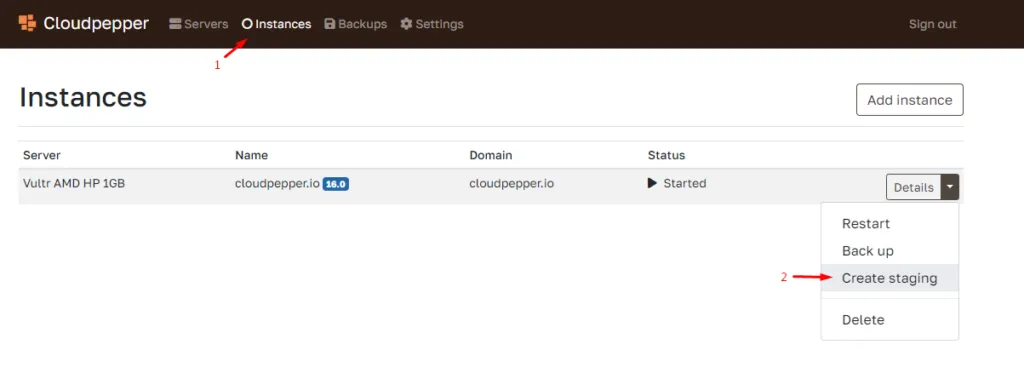
Section titled “1. Create a staging instance from your production instance”Click the dropdown button of the production instance for which you want to create a staging instance and click “Create staging”
2. Select the server and domain name
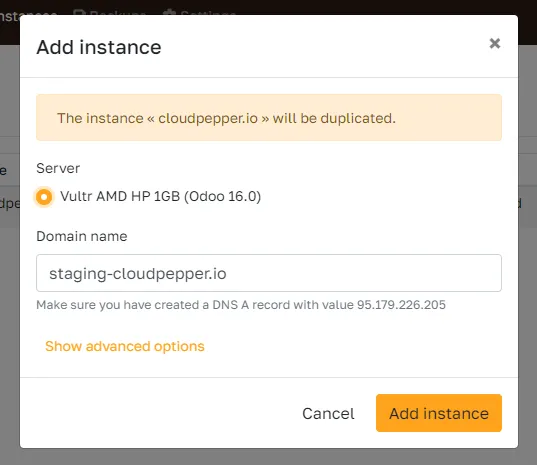
Section titled “2. Select the server and domain name”You can create your staging instance on the same server, or select a different server. Cloudpepper also allows you to set the domain name for your staging instance. Ensure to set the A record before adding the instance for proper SSL (https://) configuration.
3. Click Add instance
Section titled “3. Click Add instance”Your instance will now be duplicated from the production instance. It is also possible to restore backups to a staging instance.